| |
Wasatch Barcode "pull" in Python
This software has been produced to work with Wasatch SoftRIP and the Wasatch Automation Option. The Automation option is an extra-cost add on to Wasatch SoftRIP.
Pull from Print Queue
Complete source code is below. This Python 3 script has
been tested on Windows, and can easily be adapted for
Linux or other environments. It has been kept simple to
serve as an illustration. Refer to documentation for Job
Submission in the XML Access Option. This is a simple
piece of software. Wasatch SoftRIP and the XML are doing all the "heavy lifting".
This example pulls jobs from a Print Queue, after they have already been RIP'ed and commited to a printer. For a similar sample, to pull from a central repository in a large bank of RIP's and printers, see our related barcode pull sample.
This script simply looks for a match to a file name, but it can be modified to find files based on regular expression string matching. See the 'SOURCEFILEREGEXI' tag in the help under Wasatch API (Job Submission), which can easily be used in place of the 'SOURCEFILE' tag in this example.
That is an option, but the first step in using this simple example is to set up Wasatch SoftRIP and an XML file, along with an active hot folder for the print unit being used. Configure the hot folder for "RIP Only", as shown here:
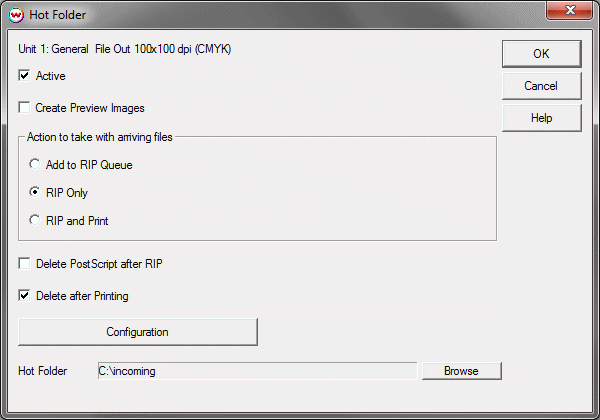
Files placed into the hot folder will be RIP'ed and then held in suspense in the "Print Queue", ready to be pulled out through scanning of the barcode. The "Print Queue" can comfortably hold up to 10,000 jobs ready-to-go, on a suitably configured computer.
This software has been tested with the Datalogic QuickScan QD2100 barcode scanner configured to communicate via 'USB-COM-STD' (simulates RS-232 standard interface). See Datalogic's Quick Reference Guide for more information.
Source Code
|
|