DCS2 and Image Format Options
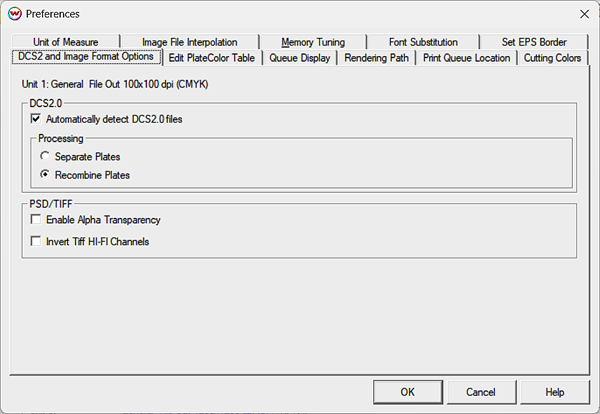
This control allows you to specify how certain file formats DCS2, PSD, and TIFF will be interpreted. When you launch the File menu from the main window, you will see the window below. Select the DCS2 and Image Format Options tab.
DCS2
Automatically detect DCS2.0 files: When this control is checked, the PostScript Interpreter in SoftRIP checks to determine whether incoming files are DCS2 files.
Separate Plates: The DCS2 file is treated as a multi-page document, with each color being processed separately, as a monochrome image.
Recombine Plates: The DCS2 file is treated as a single-page document, and each color is combined into a single composite image.
PSD/TIFF
There are a variety of ways to interpret these files in various workflows.
Enable Alpha Transparency will processed alpha channel transparencies correctly when this is checked.
Otherwise, the transparency channels may be ignored. Some experimentation may be needed for specific workflows.
Invert Tiff HI-FI Channels: This option may be needed on certain Tiff files that include additional Hi-Fi channels. Try turning on this option when Hi-Fi Tiff files look incorrect when previewed or printed. Some experimentation may be needed for specific workflows.
NOTE: Multi-Channel Tiff files are a common file type that can be exported from profiling software, like software from X-Rite, and this option needs to be turned on for SoftRIP to properly process it.